Frequently Asked Questions
About EnergyCloud
Climote Smart Immersion Switch
Joining or Leaving the Service
Installation
Using your Hot Water
Costs and Refunds
What will the refund look like on my bill?
Troubleshooting Issues
Elnur Storage Heaters
Your Personal Data
Customer Care
What Can I Do to Support Action on Energy Poverty and Renewable Energy Curtailment in Ireland?
About EnergyCloud
What is EnergyCloud?
EnergyCloud is an Irish charity with a vision is to end energy poverty. We do this by advocating for better Government policy and delivery and EnergyCloud is already delivering practical, measurable impact by demonstrating the potential of surplus renewable energy to support households experiencing energy poverty. Through partnerships with government, local authorities, approved housing bodies and energy partners, we deliver free energy to homes across Ireland.
What is surplus energy?
At certain times, renewable energy generation exceeds electricity demand, resulting in surplus energy on the grid. At the moment it is dispatched down whereby it goes to waste.
EnergyCloud are demonstrating the potential of surplus renewable energy to provide real benefits to people across Ireland facing difficulties with energy bills.
In 2025 we provided free energy to residents on 114 nights.
Climote – Smart Immersion Switch
What is the Climote device?
Climote is a smart device installed in your home.
It connects to your immersion heater and allows EnergyCloud to switch it on heating your water for free.
The device only controls your immersion heater. It does not affect your electricity supply or any other appliances.
How often will I receive free hot water?
This depends on when surplus wind energy is available.
When it is available, your water will usually be heated overnight, often between 3am and 7am.
You will receive a message to let you know when your water is heated.
What happens if there is no extra wind energy available?
Your hot water system will continue to work as normal.
You can use your immersion heater whenever you need hot water.
How are advance messages for free hot water events decided?
We continuously monitor forecasts to see when extra energy is likely to be available. If we’re confident that a free hot water event will take place, we may send a notification in advance.
However, weather and energy forecasts can change, so it’s not always possible to know for sure the night before. To avoid sending notifications that may not happen, we only send advance messages when we have a high level of confidence.
If we’re not confident enough to send a message in advance, residents will receive a confirmation message the next morning if free water was successfully delivered.
Joining or Leaving the Service
Do I have to sign up?
No. The EnergyCloud service is optional.
Can I leave the service later if I change my mind?
Yes. You can leave the service at any time.
Contact EnergyCloud and ask us to disable the device remotely, or turn off the device in your home.
Installation
What will the installer do when they visit my home?
The installer will remove your current immersion switch or timer and install a small control unit on the wall.
There is no building work required. The installation is straightforward and usually takes about two hours.
When will the Climote device be installed?
An installer will contact you to arrange a time that suits you.
Your device is usually installed within two months of signing up.
What can I do to prepare for the installer?
Please do not boost or heat your water the night before installation.
This helps make sure the installer can test the device properly.
Please ensure the hot water tank is accessible for the installer.
Where will the device be installed?
The installer will choose a safe and suitable place, usually in the hallway.
The device will not be installed in bedrooms or inside hot presses.
What will happen to my old immersion switch?
The installer will leave the old immersion switch/timer at the property for the homeowner to dispose of.
(Please note the Climote app can be installed on the homeowners phone to allow them to schedule when the immersion is switched on. Alternatively they can simply switch on the immersion using the boost button on the device)
Using Your Hot Water
Can I still control my immersion?
Yes. You can still control your hot water.
You can turn on your immersion heater whenever you need hot water and choose the times you want to heat your water.
Do I need to do anything after the device is installed?
No. The Climote device works automatically.
When extra wind energy is available, your water may heat overnight.
We will send you a message to let you know when your water is being heated and when it has been heated.
Will the device affect my electricity supply?
No. The device only controls your immersion heater.
It does not affect your electricity supply or any other appliances in your home.
Is the device safe?
Yes. The device is professionally installed and meets electrical safety standards.
It is designed for safe use in homes.
Costs and Refunds
Energy provider partners
EnergyCloud are partnered with the following energy providers:
Bord Gáis, Electric Ireland, Flogas, Pinergy, Prepay Power & SSE Airticity
EnergyCloud are not currently partnered with Energia or Yuno Energy.
Will this increase my electricity bill?
No. Any electricity used to heat your water through the EnergyCloud service is refunded, so your hot water costs you nothing.
How do I receive my refund?
Your electricity account will show the usage as normal.
EnergyCloud tells your electricity provider how much energy was used through the service. Your provider then applies the refund to your account.
Refunds are usually applied at the start of the following month.
Refund Tariff
The retailers which are part of the EnergyCloud program may apply a fixed tariff or payment rate for credits for their own administrative reasons. Where this applies, any credits, payments, or values shown may be based on this tariff rather than the resident’s exact electricity tariff or real-time market rates.
How will the refund appear?
If You are a Bill Pay Customer
At the start of the following month, you will see a credit on your electricity bill. This credit covers the cost of heating your water through the EnergyCloud service.
If You are a PrepayPower Customer
At the start of the following month:
Smart meter: the credit will be added to your meter automatically.
Classic meter: you will receive a text message with a top-up code.
If you are an Electric Ireland Prepay Customer
At the start of the following month, you will receive your refund as a voucher.
Electric Ireland vouchers must be at least €10. If your refund amount is less than €10, it will be added to your next voucher until it reaches the minimum amount.
What will the refund look like on my bill?
Prepay Power
If you are a PrePay Power customer, you will receive your refund as a free top-up to your account.
Refunds are processed in €5 increments. If your refund balance is less than €5, it will be carried over to the following month and issued once your total refund credit reaches €5.
If you have a smart meter, the top-up will be added automatically. You will receive a text message confirming the money has been added to your balance.
The message will look like this:
“Dear customer, As part of the PrePay Power partnership with EnergyCloud, we have added €XXX to your account balance.”
If you have a classic meter, you will receive a text message with a top-up code. You will need to enter this code into your meter to add the credit.
The message will look like this:
“Dear customer, As part of the PrePay Power partnership with EnergyCloud, we have added €XXX to your account balance. Please use this top-up code to add the credit: [CODE].”
This top-up covers the cost of heating your water, so you receive it for free.
SSE Airtricity
If you are an SSE Airtricity customer, the refund will appear on your electricity bill as a line called “Goodwill Gesture.”
It will show a negative amount, meaning the money has been returned to your account.
FLOGAS
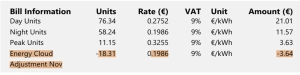
If you are a Flogas customer, your refund will always show on the second page of your bill as a line item called ‘EnergyCloud’. It will also show details about the units credited, the rate that applied and the amount of the refund.
Electric Ireland
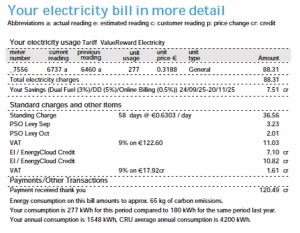
If you are an Electric Ireland Bill Pay customer, your refund will appear on your electricity bill as a line item labelled “EI/EnergyCloud Credit”.
Prepay customers will also see the text “EI/EnergyCloud Credit” on the online portal.
Your bill may show more than one EI / EnergyCloud Credit if the refund covers more than one billing period. VAT is also refunded, and this will appear as part of the total refund.
Example
The example bill below is for a customer who is billed every two months. That’s why there are two line items for EI / EnergyCloud Credit, for €7.10 and €10.82.
The VAT for that total is also refunded, for €1.61.
Therefore, the total refund is €19.63.
Bord Gáis
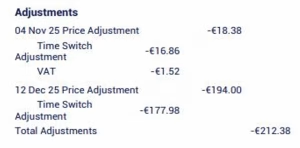
If you are a Bord Gáis customer, EnergyCloud will tell Bord Gáis how much energy to refund to your account.
Bord Gáis uses your normal tariff rate to calculate the amount. This amount is then refunded to your account.
You will see this on your bill as a line called “adjustment.”
Troubleshooting Issues
My Climote screen is blank or switched off. Is it working?
When the device is on, you will see an image of a tank.
If the screen is blank, the device may be switched off.
To switch it on, find the black button above the blue boost button on the unit. Press the black button firmly so it stays in.
I am having problems using my Climote app. What should I do?
Please visit the FAQ section on the Climote website for help with the app and device settings.
Elnur Storage Heaters
What are the benefits of changing to the Elnur Storage heaters?
Elnur storage heaters are energy efficient, helping to reduce electricity consumption while heating your home.
They can be controlled from your phone, so you decide when your home is warm, not the other way around.
You can also monitor your energy consumption through the app if you wish to keep an eye on your usage.
They have a smaller carbon footprint than older storage heaters.
High Heat Retention: Thanks to thick insulation and isolated air cavities, the ECO HHRPLUS can retain a large portion of stored heat, reducing overnight losses.
Renewable Compatible: Capable of using renewable electricity to charge the heating elements, converting free or low-cost renewable energy into stored heat.
Smart Charge Planning: Uses “IEM” intelligent charging logic to calculate how much energy to store based on past usage and ambient conditions.
WiFi / App Control: Fully Wi-Fi compatible so users can control schedules, setpoints and heating modes from the free Elnur app.
Fan-Assisted: A built-in fan helps distribute heat more quickly when required, reducing warm-up times.
Warranty: A 12-year warranty is included, providing complete parts and labour protection.
Joining the EnergyCloud programme
As part of the upgrade of storage heaters, your new heaters will automatically be enrolled in the EnergyCloud programme once you complete the sign up form.
EnergyCloud monitors the national electricity grid overnight, and when there is surplus wind energy available, the energy your heaters use during that period will be discounted or credited back to your electricity account. It is usually between the hours of 3-7am
Your Smart Storage Heater Installation – What to Expect
1. Complete the EnergyCloud Sign-Up Form
Complete and submit the EnergyCloud sign-up form to begin the process.
2. Home Survey
An Elnur representative will visit your home to carry out a survey and assess the number and size of storage heaters required for your property.
3. Arrange Your Installation
Once the survey is complete, EnergyCloud will contact you to arrange a suitable date for the installation of your new heaters.
4. Installation
Your new smart storage heaters will be professionally installed. Your existing heaters will be removed and disposed of responsibly.
5. Start Enjoying the Benefits
Enjoy the comfort and efficiency of your new smart storage heaters, with the added benefit of receiving free energy from EnergyCloud when surplus renewable electricity is available on the grid.
What model of Elnur storage heaters does EnergyCloud use?
The model of heaters is the HHR Plus Model.
Smart Storage Heater IEM Technology
ECOHHR Plus Storage Heater User Guide
User Guide for Your ECOHHR PLUS Storage Heaters 2026
Setting the schedule
How to Set a Schedule – GCONTROL App Guide 2026
Changing your heater schedule using your app.
Can you control the heater settings without the app?
Yes – The heaters can be fully controlled from the heater itself. You do not need to use the app. You can switch it on/off, adjust the temperature and set the timer.
Changing the temperature
How to Change the Temperature – GCONTROL Guide 2026
Changing your heater temperature via the app
Changing your heater temperature directly on your heater
Information about the Elnur HHR Plus smart storage heaters
ECOHHR High Heat Retention Storage Heater – ELNUR UK
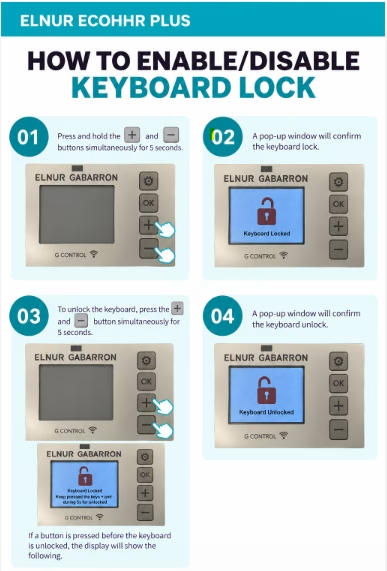
How to use the child lock feature
Costs and Refunds
What will the refund look like on my bill?
Personal Data
What happens to my personal data if I sign up?
We need some basic information so you can receive free energy through the EnergyCloud service.
We use this information to operate your smart device (Climote, Elnur or Planet Devices) arrange refunds with your electricity provider and message you with updates.
Your information is kept secure and is only used to operate the EnergyCloud service.
I have changed my electricity provider. What should I do?
Please contact us at support.ireland@energycloud.org and tell us your new electricity provider.
This helps us make sure you continue to receive your refunds.
Customer Care
We’re Here to Help
Have a question about EnergyCloud?
Need support, guidance, or simply want to learn more about what we do?
Our team is always happy to help and would love to hear from you.
Contact Support
Email: support.ireland@energycloud.org
🕘 Office Hours:
Monday – Friday
09:00 – 17:30
(Closed on bank and public holidays)
What Can I Do to Support Action on Energy Poverty and Renewable Energy Curtailment in Ireland?
If you’d like to help end energy poverty in Ireland, reduce energy waste, and make better use of renewable energy that is currently being curtailed, send this letter to your local government representative and urge them to support meaningful policy change at the national level.
To find out who to address your letter to, view the list of your local TDs here.
Who are my TDs? – Electoral Commission
****************************************************************************************************
Dear [Representative’s Name],
I am writing to express my concern about the growing amount of renewable electricity that is being curtailed in Ireland each year. At times when renewable energy generation exceeds the capacity of the grid to use or distribute it, clean electricity is simply switched off rather than being put to productive use.
This waste is particularly difficult to accept at a time when many households are struggling with the high cost of energy and are being forced to choose between heating their homes, buying food, or meeting other essential expenses. At the same time, Ireland is under pressure to meet its EU climate targets.
I urge you to encourage your party and the Government to step up and implement meaningful policy changes that will reduce renewable energy curtailment, accelerate grid improvements, and ensure that the clean energy produced in Ireland is put to productive use rather than being wasted.
Organisations such as EnergyCloud are campaigning for practical solutions that can help address this issue. I ask that you support these efforts and champion policies that make better use of Ireland’s renewable energy resources.
Ireland cannot afford to waste clean energy while families face high energy costs and the country works towards its climate commitments. I would appreciate hearing what actions you will take to address this issue.
Yours sincerely,
[Your Name]